Showing posts with label REST API. Show all posts

Thursday, 9 December 2021

Best practices with gRPC on .NET

 In my last couple of articles on gRPC gRPC on .NET and Streaming with gRPC on .NET we talked about creating microservices APIs using gRPC.

Recap: What we learned so far is, gRPC is a framework to create high-performance microservice APIs built on Remote Procedure Call (RPC) pattern. It uses three basic concepts Channel, Remote Procedure calls (streams) and Messages.

It uses HTTP/2 protocol for communication and in asp.net core it is over TCP.

In gRPC .NET client-server communication goes through multiple round-trip network call to finally establish the HTTP/2 connection and that goes as:
1. Opening a socket
2. Establishing TCP connection
3. Negotiating TLS
4. Starting HTTP/2 connection

After this when the channel connection is ready to listen and serve, the communication starts where the one channel can have multiple RPCs (streams) and a stream is a collection of many messages.

gRPC purpose is to provide a high throughput performative microservice APIs architecture but to get the best of it we must follow the certain best practices otherwise our design can create a bottleneck in terms of performance.

So lets see what are the best practices to follow while designing gRPC API.

1. Reusing your gRPC channels

As we see, gRPC communication requires multiple network round-trips so we need to think about this to save the time here.
Actually it is advisable to have a factory implementation to create the client and reuse it. if the client is an ASP.NET Core application then we can even take extra benefit of ASP.NET Core Dependency Injection to resolve gRPC client dependency when we need once we create. Below is code example to register the gRPC client in Core.

services.AddGrpcClient<WeatherForcast.WeatherForcastClient>(o =>
{
o.Address = new Uri("https://localhost:7001");
});

Read more about gRPC client factory integration in .Net here.

2. Consider Connection Concurrency

A gRPC channel uses a single HTTP/2 connection, and concurrent calls are multiplexed on that connection. HTTP/2 connections comes with limit on maximum concurrent streams for a connection. Generally most of the server set this limit to 100 concurrent streams.
Now if we follow the best practices 1 discussed above, we might get into a another problem When the number of active calls reaches the connection stream limit, additional calls are queued in the client.

To overcome this, .NET 5 introduces the SocketsHttpHandler.EnableMultipleHttp2Connections property. When set to true, additional HTTP/2 connections are created by a channel when the concurrent stream limit is reached. By default, when a GrpcChannel is created its internal SocketsHttpHandler is automatically configured to create additional HTTP/2 connections.

In case if you are using your own handler then you must consider setting property manually. i.e.

var channel = GrpcChannel.ForAddress("https://localhost", new GrpcChannelOptions
{
HttpHandler = new SocketsHttpHandler
{
EnableMultipleHttp2Connections = true,
}
});

3. Load balancing options

We talk about microservices and we don’t talk about the load balancing, how is that possible.

Well the catch here is, gRPC doesn’t work with L4 (transport) load balancers, as the L4 load balancers operates at a connection level and gRPC uses HTTP/2, which multiplexes multiple calls on a single TCP connection which results all gRPC calls over the connection go to one endpoint. Hence the recommended best effective load balance for gRPC are:

i. Client-side load balancing
In Client side load balancing, the client is aware of multiple backend servers and chooses one to use for each RPC.
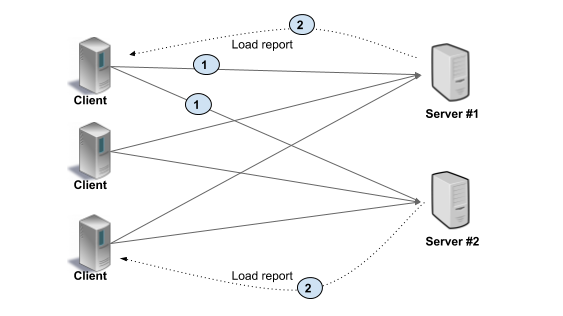
lients periodically makes a request to backend servers and gets the load reports and then clients implements the load balancing algorithm based on server load report.
In the simpler scenario, clients can use simple round robin algorithm by ignoring server’s load report.

Benefit of this architecture is no extra loop or middle agent unlike proxy server and this can gain high performance.

Drawback of this architecture is, Clients implementing load balancing algorithms and keeping track of server load and health can make clients complex and create maintenance burden. Also the clients must be trusted in this case to go for this architecture.

ii. L7 (Application) proxy load balancing
It uses the proxies server concepts and Clients doesn’t know the backend servers.

Here the Load Balance Proxy Server keeps track of load on each backend and implements algorithms for distributing load fairly. Clients always makes the request to Load Balancer and then the load balancer server passes the request to one of the available backend server.
This architecture is typically used for user facing services where clients from open internet can connect to servers in a data center.

Benefit of this architecture is, it works with untrusted clients and clients doesn’t have to do anything to do with load balancing.

Drawback of this architecture could be proxy server throughput which may limit the scalability.

Note: Only gRPC calls can be load balanced between endpoints. Once a streaming gRPC call is established, all messages sent over the stream go to one endpoint.

4. Inter-process communication

gRPC calls between a client and service are usually sent over TCP sockets. TCP is great for communicating across a network, but inter-process communication (IPC) is more efficient when the client and service are on the same machine.

5. Keep alive pings

Keep alive pings can be used to keep HTTP/2 connections alive during periods of inactivity. Having an existing HTTP/2 connection ready when an app resumes activity allows for the initial gRPC calls to be made quickly, without a delay caused by the connection being reestablished.
Keep alive pings are configured on SocketHttpHandler and below is the code example to achieve the same

var handler = new SocketsHttpHandler
{
PooledConnectionIdleTimeout = Timeout.InfiniteTimeSpan,
KeepAlivePingDelay = TimeSpan.FromSeconds(60),
KeepAlivePingTimeout = TimeSpan.FromSeconds(30),

EnableMultipleHttp2Connections = true
};
var channel = GrpcChannel.ForAddress("https://localhost:7001", new GrpcChannelOptions
{
HttpHandler = handler
});

From the above code:
PooledConnectionIdleTimeout: defines how long a connection can be idle in the pool to be considered reusable.
KeepAlivePingDelay: sets the keep alive ping delay.
KeepAlivePingTimeout: sets the keep alive ping timeout.

6. Go Streaming wisely

gRPC bidirectional streaming can be used to replace unary gRPC calls in high-performance scenarios whenever possible.
Consider an example of calling the gRPC service in a loop, in this case instead of making a new call in loop it could be wise to go with bidirectional streaming with cancellation token option.

Replacing unary calls with bidirectional streaming for performance reasons is an advanced technique and is not appropriate in many situations so reevaluate your design if you are doing so.

7. Stay with Binary payloads

Binary payloads are default supported in Protobuf with the bytes scalar value type so you are good unless you are using other serializer like JSON as gRPC supports other serialize-deserialize methods too.

8. Send and read binary payloads without copying it

When you are dealing with ByteString instance for the request or response, it is recommended that to use UnsafeByteOperations.UnsafeWrap() instead of ByteString.CopyFrom(byte[] data). Benefit of this is, it doesn’t create a copy of byte arrays but make sure this byte array is not being modified while it is in use. Example:
Send binary payloads

var data = await File.ReadAllBytesAsync(path);var payload = new PayloadResponse();
payload.Data = UnsafeByteOperations.UnsafeWrap(data);

Read binary payloads

var byteString = UnsafeByteOperations.UnsafeWrap(new byte[] { 0, 1, 2 });
var data = byteString.Span;
for (var i = 0; i < data.Length; i++)
{
Console.WriteLine(data[i]);
}

9. Make gRPC reliable by using deadlines and cancellation options

deadline allows a gRPC client to specify how long it will wait for a call to complete. When a deadline is exceeded, the call is canceled. Setting a deadline is important because it provides an upper limit on how long a call can run for. It stops misbehaving services from running forever and exhausting server resources.
Cancellation allows a gRPC client to cancel long running calls that are no longer needed. For example, a gRPC call that streams realtime updates is started when the user visits a page on a website. The stream should be canceled when the user navigates away from the page. Here is the way we can use it with client:

using var channel = GrpcChannel.ForAddress("https://localhost:7001");try
{
var cancellationToken = new CancellationTokenSource(TimeSpan.FromSeconds(10));

using var streamingCall = weatherClient.GetWeatherForecastStream(new Empty(), deadline: DateTime.UtcNow.AddSeconds(5));
await foreach (var weatherData in streamingCall.ResponseStream.ReadAllAsync(cancellationToken: cancellationToken.Token))
{
Console.WriteLine(weatherData);
}
Console.WriteLine("Stream completed.");
}
catch (RpcException ex) when (ex.StatusCode == StatusCode.Cancelled || ex.StatusCode == StatusCode.DeadlineExceeded)
{
Console.WriteLine("Stream cancelled/timeout.");
}

Use the cancellation token received as deadline in server side as:

public override async Task GetWeatherForecastStream(Empty request, IServerStreamWriter<WeatherForecast> responseStream, ServerCallContext context)
{
var i = 0;
while(!context.CancellationToken.IsCancellationRequested && i <50)
{
await Task.Delay(1000);
await responseStream.WriteAsync(_weatherForecastService.GetWeatherForecast(i));
i++;
}
}

With above (please follow my previous article and mentioned github link to download the code) timeout will occure (DeadlineExceeded) if stop the breakpoint in client code at “ Console.WriteLine(weatherData);” means stop reading the stream.

10. Use Transient fault handling with gRPC retries

gRPC retries is a feature that allows gRPC clients to automatically retry failed calls.
gRPC retries requires Grpc.Net.Client version 2.36.0 or later.

var defaultMethodConfig = new MethodConfig
{
Names = { MethodName.Default },
RetryPolicy = new RetryPolicy
{
MaxAttempts = 5,
InitialBackoff = TimeSpan.FromSeconds(1),
MaxBackoff = TimeSpan.FromSeconds(5),
BackoffMultiplier = 1.5,
RetryableStatusCodes = { StatusCode.Unavailable }
}
};
var channel = GrpcChannel.ForAddress("https://localhost:7001", new GrpcChannelOptions
{
ServiceConfig = new ServiceConfig { MethodConfigs = { defaultMethodConfig } }
});

With above code example, Retry policies can be configured per-method and methods are matched using the Names property. Above code is configured with MethodName.Default, so it's applied to all gRPC methods called by this channel.

Above 10 points are make your gRPC highly available and work effectively hence keep a checkpoint while designing your gRPC API.

Thank you reading. Don’t forget to clap if you like and leave comments for suggestion.

Thursday, 2 December 2021

Streaming with gRPC on .NET

 I just couldn’t stop myself to dig more into gRPC on .NET, I found it really interesting and fun in learning. In my last article here gRPC on .NET, I have demonstrated about “How to create gRPC API in .NET 6”. I feel that one is good article to start with for gRPC learning.

Here I’m going to demonstrate the different types of service methods which gRPC supports for API and these are:

1. Unary RPCswhere the client sends a single request to a server and gets a single response, as demonstrate in my previous article. i.e.

rpc GetWeatherForecastForDate (google.protobuf.Timestamp) returns (WeatherForecastReply);

2. Server streaming RPCswhere the client sends a request to the server and gets a stream to read a sequence of messages back. The client reads from the returned stream until there are no more messages. gRPC guarantees message ordering within an individual RPC call. i.e.

rpc GetWeatherForecastStream (google.protobuf.Empty) returns (stream WeatherForecast);

3. Client streaming RPCs: where the client writes a sequence of messages and sends them to the server, again using a provided stream. Once the client has finished writing the messages, it waits for the server to read them and return its response. Again gRPC guarantees message ordering within an individual RPC call. i.e.

rpc GetWeatherForecastDuplexStream (stream StreamMessage) returns (WeatherForecastReply);

4. Bidirectional streaming RPCs: where both sides send a sequence of messages using a read-write stream. The two streams operate independently, so clients and servers can read and write in whatever order they like: for example, the server could wait to receive all the client messages before writing its responses, or it could alternately read a message then write a message, or some other combination of reads and writes. The order of messages in each stream is preserved.

rpc GetWeatherForecastDuplexStream (stream StreamMessage) returns (stream WeatherForecast);

The service methods which I shown here, I’m going to demonstrate how we can write them and consume them. In my last article I used the weather forecast example hence enhancing the same example here.

In all above example I added a new message type “StreamMessage” so lets include that first in your weatherForcaste.proto file and do the same (copy-paste the proto file) for client project as well.

syntax = "proto3";import "google/protobuf/timestamp.proto";
import "google/protobuf/empty.proto";
option csharp_namespace = "GrpcServiceDemo";package weatherForcast;// The weather forecast service definition.
service WeatherForcast {
// Get weather forecast: Unary RPCs
rpc GetWeatherForecast (google.protobuf.Empty) returns (WeatherForecastReply);
// Get weather forecast: Unary RPCs
rpc GetWeatherForecastForDate (google.protobuf.Timestamp) returns (WeatherForecastReply);
// Get weather forecast: Server Streaming RPCs
rpc GetWeatherForecastStream (google.protobuf.Empty) returns (stream WeatherForecast);
// Get weather forecast: Client Streaming RPCs
rpc GetWeatherForecastClientStream (stream StreamMessage) returns (WeatherForecastReply);
// Get weather forecast: Bidirectional streaming RPCs
rpc GetWeatherForecastDuplexStream (stream StreamMessage) returns (stream WeatherForecast);
}// The response message containing the weather information.
message WeatherForecastReply {
repeated WeatherForecast Result = 1;
}
message WeatherForecast {
google.protobuf.Timestamp Date = 1;

int32 TemperatureC = 2;

int32 TemperatureF = 3;

string Summary = 4;
}
message StreamMessage{
int32 index = 1;
}

Since we need a new method to handle other services logic so we need to modify the interface IWeatherForcaseService.cs and WeatherForecastService.cs implementation as below.

IWeatherForcaseService.cs

using Google.Protobuf.WellKnownTypes;
using Grpc.Core;
namespace GrpcServiceDemo.Services
{
public interface IWeatherForecastService
{
Task<WeatherForecastReply> GetWeatherForecast(ServerCallContext context);
Task<WeatherForecastReply> GetWeatherForecastForDate(Timestamp date, ServerCallContext context);WeatherForecast GetWeatherForecast(int index);
}
}

WeatherForecastService.cs

using Grpc.Core;
using Google.Protobuf.WellKnownTypes;
namespace GrpcServiceDemo.Services
{
public class WeatherForecastService : IWeatherForecastService
{
private static readonly string[] Summaries = new[]
{
"Freezing", "Bracing", "Chilly", "Cool", "Mild", "Warm", "Balmy", "Hot", "Sweltering", "Scorching"
};
private readonly ILogger<WeatherForecastService> _logger;public WeatherForecastService(ILogger<WeatherForecastService> logger)
{
_logger = logger;
}
public Task<WeatherForecastReply> GetWeatherForecast(ServerCallContext context)
{
return Task.FromResult<WeatherForecastReply>(GetWeather());
}
public Task<WeatherForecastReply> GetWeatherForecastForDate(Timestamp date, ServerCallContext context)
{
return Task.FromResult<WeatherForecastReply>(GetWeather(date));
}
public WeatherForecast GetWeatherForecast(int index)
{
return GetWeather(index);
}
private WeatherForecastReply GetWeather()
{
var result = new WeatherForecastReply();
for (var index = 1; index <= 5; index++)
{
result.Result.Add(
GetWeather(index)
);
}
return result;
}
private static WeatherForecast GetWeather(int index)
{
return new WeatherForecast
{
Date = Timestamp.FromDateTime(DateTime.UtcNow.AddDays(index)),
TemperatureC = Random.Shared.Next(-20, 55),
Summary = Summaries[Random.Shared.Next(Summaries.Length)],
TemperatureF = (int)(32 + (Random.Shared.Next(-20, 55) / 0.5556))
};
}
private WeatherForecastReply GetWeather(Timestamp date)
{
var result = new WeatherForecastReply();
result.Result.Add(
new WeatherForecast
{
Date = date,
TemperatureC = Random.Shared.Next(-20, 55),
Summary = Summaries[Random.Shared.Next(Summaries.Length)],
TemperatureF = (int)(32 + (Random.Shared.Next(-20, 55) / 0.5556))
}
);
return result;
}
}
}

Now lets write the gRPC service implementation for newly defined services as below:

Server Streaming RPCs
rpc GetWeatherForecastStream (google.protobuf.Empty) returns (stream WeatherForecast);

public override async Task GetWeatherForecastStream(Empty request, IServerStreamWriter<WeatherForecast> responseStream, ServerCallContext context)
{
var i = 0;
while(!context.CancellationToken.IsCancellationRequested && i <50)
{
await Task.Delay(1000);
await responseStream.WriteAsync(_weatherForecastService.GetWeatherForecast(i));
i++;
}
}

In above code, server keeps writing to responseStream in every 1 seconds until either cancellation requested from the client or ‘i’ index value is less than 50. responseStream is of type Grpc.Core.IServerStreamWriter<T> used for sending response back to the client, it is a writable stream of the response.

Client Streaming RPCs
rpc GetWeatherForecastClientStream (stream StreamMessage) returns (WeatherForecastReply);

public override async Task<WeatherForecastReply> GetWeatherForecastClientStream(IAsyncStreamReader<StreamMessage> requestStream, ServerCallContext context)
{
var response = new WeatherForecastReply();
while (await requestStream.MoveNext() && !context.CancellationToken.IsCancellationRequested)
{
var i = requestStream.Current.Index;
response.Result.Add(_weatherForecastService.GetWeatherForecast(i));
}
return await Task.FromResult<WeatherForecastReply>(response);
}

In above code, server patiently reads input from requestStream until there is something to read(until requestStream.MoveNext() returns true) or cancellation requested and keeps preparing the result for response. Once all read is completed and notified to the server from client via call “RequestStream.CompleteAsync”, server finally sends back the response. requestStream is of type IAsyncStreamReader<T> which allows to read stream of message from request.

Bidirectional streaming RPCs
rpc GetWeatherForecastDuplexStream (stream StreamMessage) returns (stream WeatherForecast);

This is the combination of Server and client streaming and in this case server and client both are engaged to pass stream of message to each other like a chat box. Here is the code from service side.

public override async Task GetWeatherForecastDuplexStream(IAsyncStreamReader<StreamMessage> requestStream, IServerStreamWriter<WeatherForecast> responseStream, ServerCallContext context)
{
while (await requestStream.MoveNext() && !context.CancellationToken.IsCancellationRequested)
{
var i = requestStream.Current.Index;
await Task.Delay(1000);
await responseStream.WriteAsync(_weatherForecastService.GetWeatherForecast(i));
}
}

Here server patiently reads the stream messages from requestStream until there is message available and the same time keep releasing the response (responseStream.WriteAsync) as when it receives message from requestStream.

Server is ready so Now lets consume the gRPC methods from client. Lets add the code in Program.cs in client project which we created as part of previous article.

Client code for Server Streaming RPCs

try
{
var cancellationToken = new CancellationTokenSource(TimeSpan.FromSeconds(10));
using var streamingCall = weatherClient.GetWeatherForecastStream(new Empty(), cancellationToken: cancellationToken.Token);
await foreach (var weatherData in streamingCall.ResponseStream.ReadAllAsync(cancellationToken: cancellationToken.Token))
{
Console.WriteLine(weatherData);
}

Console.WriteLine("Stream completed.");
}
catch (RpcException ex) when (ex.StatusCode == StatusCode.Cancelled)
{
Console.WriteLine("Stream cancelled.");
}

In above code, we read all the messages from ResponseStream (streamingCall.ResponseStream.ReadAllAsync) until there is a message to read. Now if run the server and client, you will see the output as “getting weather data one by one every 1 second interval (as server sends in every 1 second interval).

Client code for Client Streaming RPCs

try
{
var cancellationToken = new CancellationTokenSource(TimeSpan.FromSeconds(10));
using AsyncClientStreamingCall<StreamMessage, WeatherForecastReply> clientStreamingCall = weatherClient.GetWeatherForecastClientStream(cancellationToken: cancellationToken.Token);
var i = 0;
while (true)
{
if (i >= 10)
{
await clientStreamingCall.RequestStream.CompleteAsync();
Console.WriteLine("Client Streaming completed.");
break;
}
else
{
//write to stream
await clientStreamingCall.RequestStream.WriteAsync(new StreamMessage { Index = i });
i++;
}
}
var response = await clientStreamingCall;
Console.WriteLine(response.Result);
}
catch (RpcException ex) when (ex.StatusCode == StatusCode.Cancelled)
{
Console.WriteLine("Stream cancelled.");
}

In above code, client keeps sending message one by one to the server via await clientStreamingCall.RequestStream.WriteAsync() call. Finally when it done sending the messages to the server, reads the result response from server with the code var response = await clientStreamingCall; and print.

Here if you run the server and client, you will see the output as:

Client code for Bidirectional streaming RPCs

try
{
var cancellationToken = new CancellationTokenSource(TimeSpan.FromSeconds(10));
using AsyncDuplexStreamingCall<StreamMessage, WeatherForecast> duplexStreamingCall = weatherClient.GetWeatherForecastDuplexStream(cancellationToken: cancellationToken.Token);
var i = 0;
Task task = Task.WhenAll(new[]
{
Task.Run(async () =>{
while (true)
{
if (i >= 10)
{
await duplexStreamingCall.RequestStream.CompleteAsync();
Console.WriteLine("Client Streaming completed.");
break;
}
else
{
//write to stream
await duplexStreamingCall.RequestStream.WriteAsync(new StreamMessage { Index = i });
i++;
}
}
}),
Task.Run(async () =>{
//read from stream
while (!cancellationToken.IsCancellationRequested && await duplexStreamingCall.ResponseStream.MoveNext())
{
Console.WriteLine(duplexStreamingCall.ResponseStream.Current);
}
})
});
try
{
task.Wait(cancellationToken.Token);
}
catch (OperationCanceledException e)
{
await duplexStreamingCall.RequestStream.CompleteAsync();
Thread.Sleep(6000);
}
}
catch (RpcException ex) when (ex.StatusCode == StatusCode.Cancelled)
{
Console.WriteLine("Stream cancelled.");
}

In above, we have two tasks running parallelly, one for streaming the messages “await duplexStreamingCall.RequestStream.WriteAsync(new StreamMessage { Index = i });” and the other tasks keeps reading messages form response stream sent from the server side “duplexStreamingCall.ResponseStream.Current” until there is a messge available (await duplexStreamingCall.ResponseStream.MoveNext() is true).
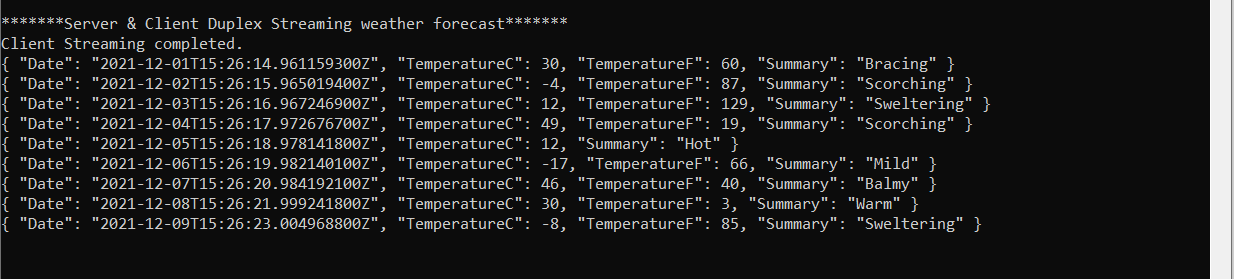
If you run the server and client, output will be as:

You can download the whole demonstration code from here:
https://github.com/binodmahto/FunProjects/tree/main/grpcAPIsDemo

Thank you reading. Don’t forget to clap if you like and leave comments for suggestion.